
How Message Sending Works
You can send emails directly to candidates from ZooKeep.
However, the sender address used for emails sent from the system will be a system-designated address, not your usual personal email address.
💡 To keep message history within the ZooKeep system, emails must be sent and received using the @app.zookeep.com domain.
Create and Send a New Message
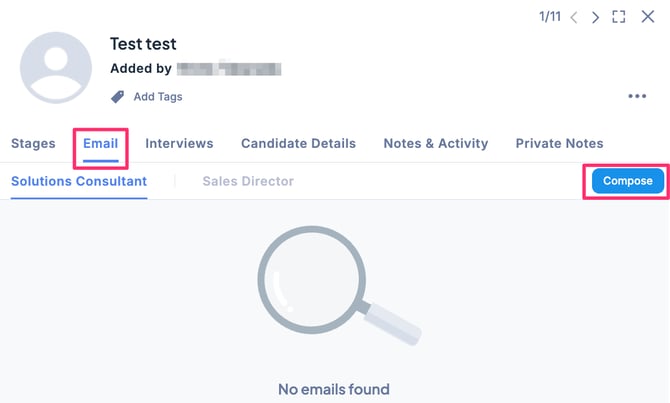
- In the Applications tab of the Job, select the candidate’s application, click the Email tab, and then click the Compose button.
- Check that the To field is correctly selected. (By default, the candidate’s primary email address is displayed.)
※ You can add or set a different email address as the recipient. It is also possible to configure CC and BCC.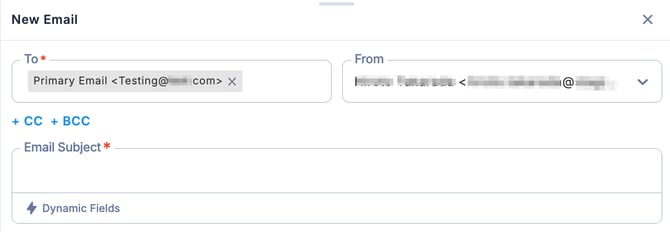
- Select the From address. (By default, you are set as the sender.)
- Enter the email subject and message.
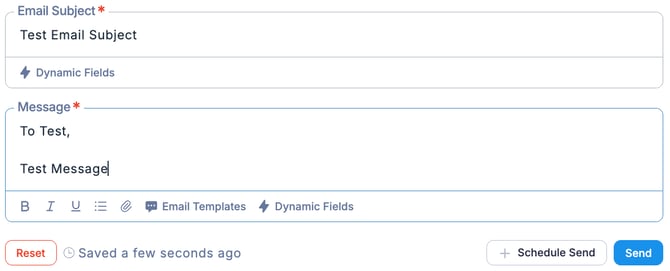
- Once you have finished entering the information, click the Send button. (Note: The message will be sent immediately when you click Send.)
💡 By using dynamic fields, specific information can be automatically inserted into the message.For more details, please refer to this section.
Reference: