
This section explains how to move a specific candidate to another Job during the hiring process.
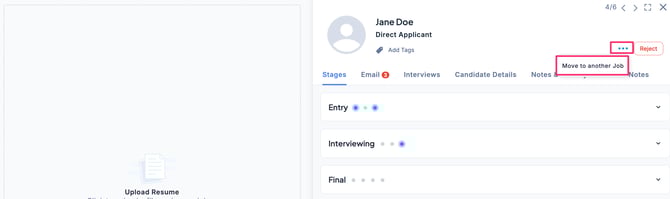
- In the Applications tab of a Job, select the candidate’s application, click the … menu, and choose Move to Another Job from the list.
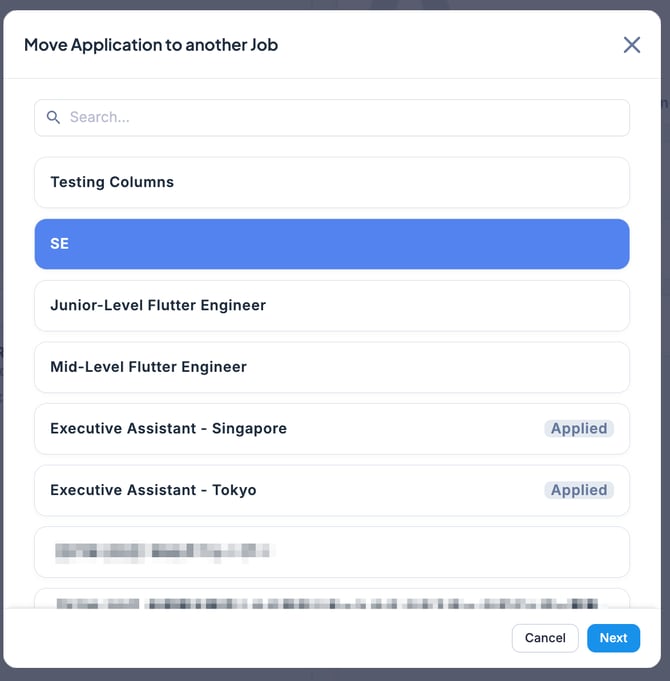
- Select the Job you want to move the candidate to, then click Next.
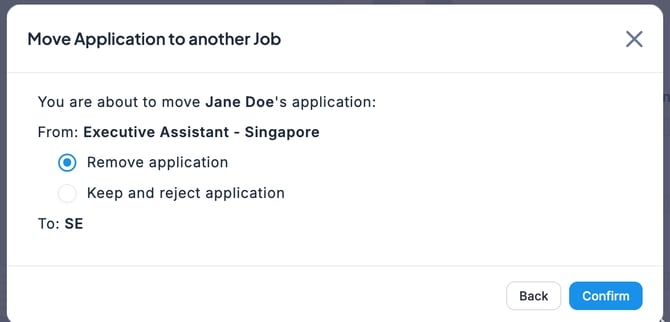
- Choose the method of transfer, then click Confirm.
- The candidate has now been successfully moved to another Job.
- Remove Application: The candidate will be completely moved from the current Job to another Job. The application will no longer appear in the original Job’s Applications screen, and the application history will not be recorded there. (However, the move will still be logged in the candidate’s activity history.)
- Keep and reject application: The application will remain recorded under the current Job, but it will be flagged as rejected. At the same time, the candidate will be moved to another Job.