
Once the hiring decision has been made, you can manage the status of the offer.
- In the Applications tab of the Job, select the candidate, then go to Stages → Final Phase → Offer Preparation, and click Offer Created. (The candidate’s status will change to Offer To Be Prepared.)

- When the offer letter is ready to be sent, click Send Offer.
You can also upload the offer letter that was sent to the candidate.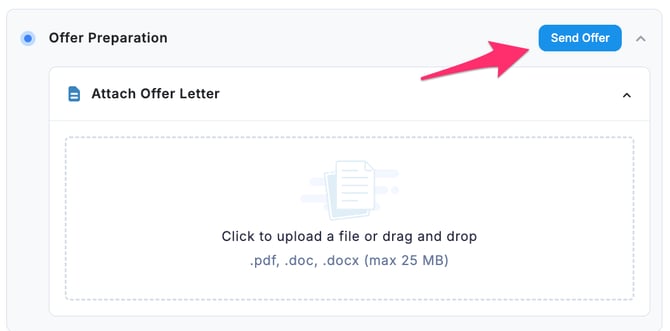
-
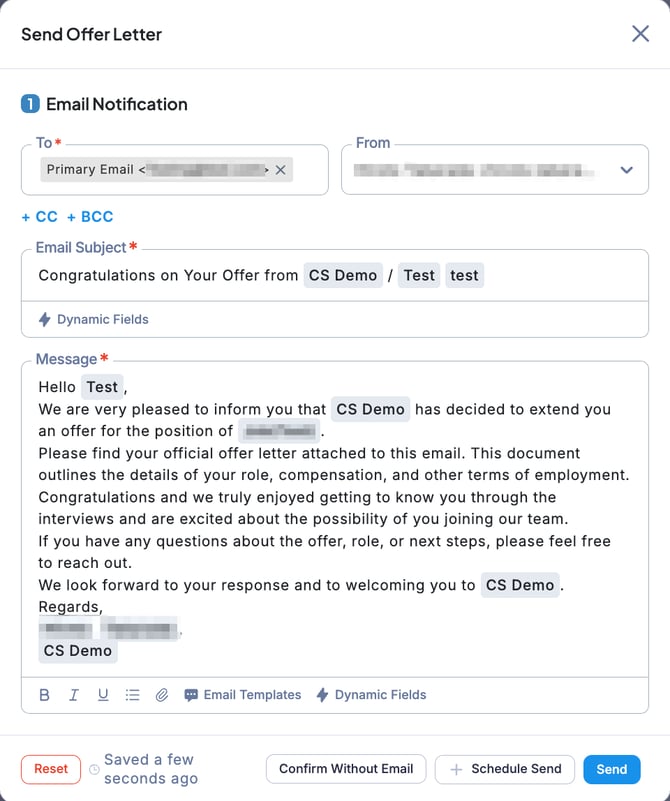
The Send Offer Letter page will open, where you can review the contents of the email notification to be sent to the candidate. Check that the recipient (To) email address and subject line are correct. • If everything is correct, click Send. • If you want to complete the offer process without sending an email, click Confirm Without Email.
-
This completes the offer process for the candidate.
💡If you want to revert the status, click the red arrow to undo it.