
Once the scheduled interview is completed, the status will change to Completed, and Assessments can be submitted.
-
In the Applications tab of the Job, select the candidate, then in the Interviewing stage under the Stages tab, click Submit Assessment.

-
When the Submit Assessment screen appears, select the assigned interviewer under Assessor, then choose the Decision.
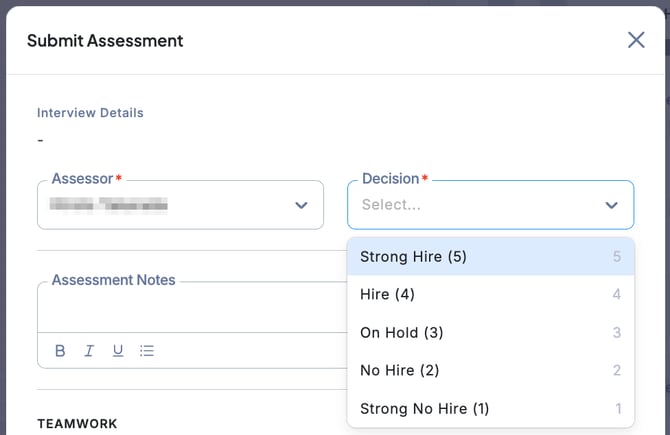
-
In the Assessment Notes field, you can enter comments.
If Core Competencies have been predefined for the Job, each item can be rated on a 5-point scale, with additional notes if needed.
Once all required information is completed, click Submit.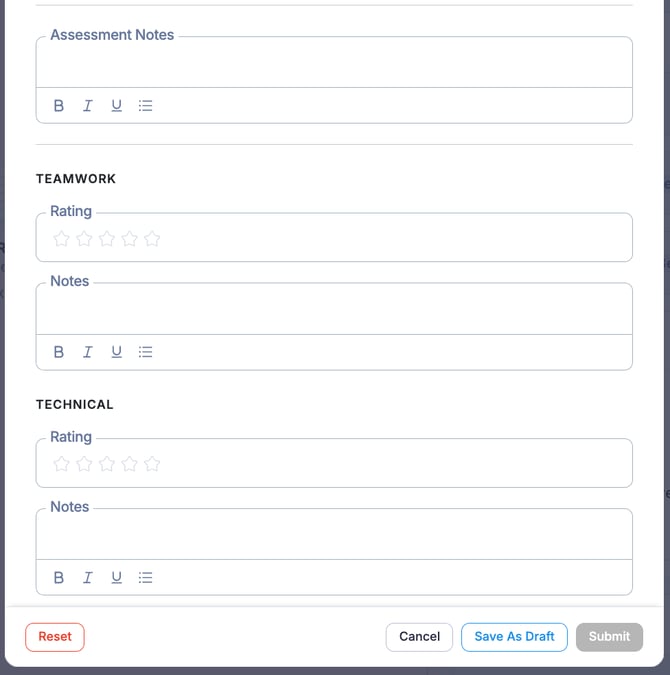
-
The interview assessment has now been submitted.

💡 The Core Competencies items reflect the settings configured in the Job’s Hiring Process.