
The dashboard allows you to view the progress of the jobs you are responsible for and manage candidate-related tasks—all on a single screen.
※ The information displayed may vary depending on your user permissions.
You can also quickly access pages such as Jobs and Candidates with a single click from the sidebar on the left side of the screen.
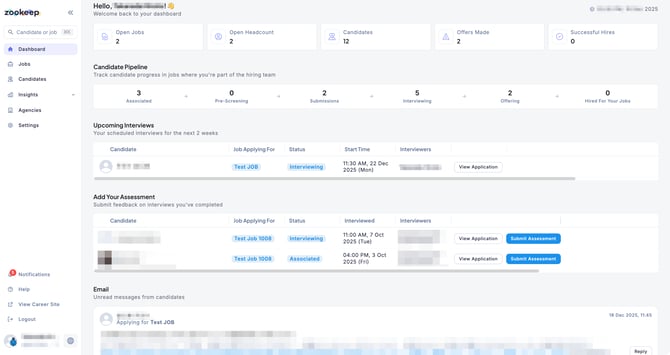
Job Progress Summary
You can review key metrics for each job you are responsible for, including:
-
Number of applicants
-
Number of offers made
-
Planned hiring headcount
Candidate Pipeline
For jobs you are involved in, the number of candidates at each stage of the hiring process is displayed in a clear overview.
Upcoming Interviews
You can check the interviews you are assigned to that are scheduled within the next two weeks.
Add Your Assessment
After interviews are completed, you can review interviews with pending evaluations and submit your feedback directly from the dashboard.
You can view the communication history with candidates you are corresponding with, helping you stay on top of candidate interactions.